

Comments13Characters 588Views1min57sRead

A well-built Q&A system is a cornerstone of strong user experience for any WordPress site. The right Q&A plugin empowers you to create polished, interactive community spaces, streamline customer support, and build out a comprehensive knowledge base with ease. In this guide, we’ve curated four leading WordPress Q&A plugins chosen for their versatility, ease of use, and practical feature sets — each suited to different site goals and use cases. Read on for a full breakdown of each plugin’s core advantages, and how they can help you build a more engaging cross-border business website.
1. QAPress
QAPress stands out for its polished interface and user-centric design, making it a strong fit for Chinese site operators. It includes native content moderation for both questions and replies, plus configurable submission rate limits and keyword filtering — all built to curb spam, promotional posts, and inappropriate content before they reach your live site.
The plugin also delivers broad theme compatibility: it works flawlessly with themes built by WPCOM, as well as all third-party WordPress themes. Key features include best answer marking, reply upvoting, and granular controls over Q&A posting frequency. You can sort questions by popularity or recency, customize color schemes and ad placements, and enable image uploads for both questions and answers.
2. Heroic FAQs
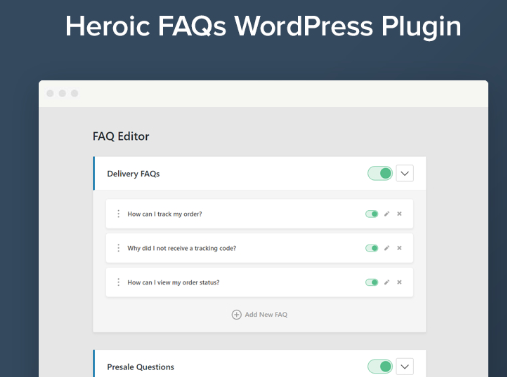
Heroic FAQs is a lightweight, flexible solution that lets you add FAQ sections anywhere across your WordPress site. Its intuitive drag-and-drop builder makes it simple to create, group, and reorder question-and-answer pairs — no coding required. You can edit all your content in a single dashboard, and enrich entries with rich media including images, videos, lists, and blockquotes.
- Prebuilt Style Packs: Choose from 5 ready-to-use design templates with extensive customization controls, so you can align your FAQ pages perfectly with your brand’s visual identity.
- Fully Responsive Layout: Every FAQ element renders cleanly and consistently across desktops, laptops, tablets, and mobile devices.
- Universal Theme Compatibility: Heroic FAQs works with every WordPress theme. You can embed FAQ content anywhere on your site using shortcodes, including within posts, pages, and sidebar widgets.
3. YITH WooCommerce Questions and Answers
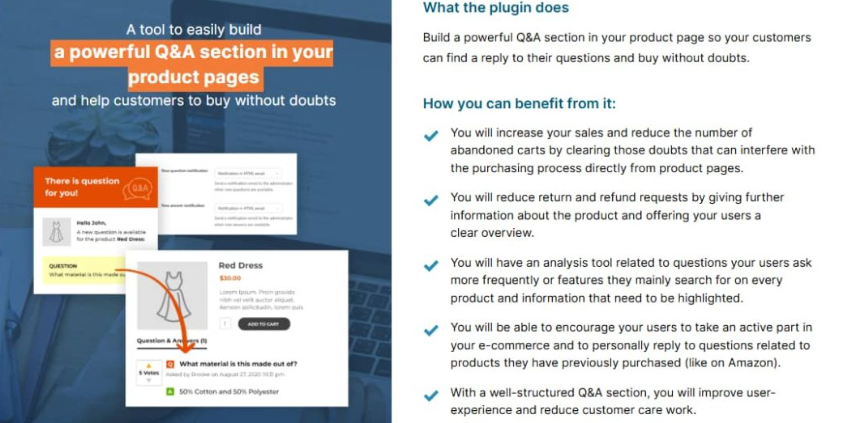
Built exclusively for WooCommerce stores, YITH WooCommerce Questions and Answers is purpose-built for ecommerce sites running on WordPress. It adds a dedicated Q&A section directly to product listing pages and individual product detail pages.
Shoppers can submit product-specific questions right on the product page, and receive answers from your store team or fellow customers. In many cases, existing customers will proactively answer questions from prospective buyers, cutting down significantly on repetitive support tasks for your team.
Keep in mind that open user submissions require active moderation. Unvetted user-generated content carries inherent risks — for instance, inaccurate or negative remarks could damage how shoppers perceive your products. If you are not prepared to moderate user-submitted Q&As, we recommend populating the section with pre-written official FAQs instead.
4. AnsPress
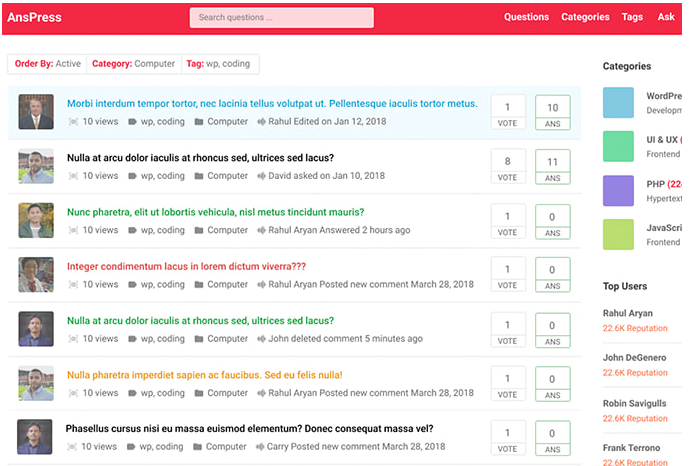
If you’re looking to launch a full-featured community Q&A board quickly and for free, AnsPress is the top choice. It comes with a complete post voting system, a straightforward admin interface that’s easy to master, and strong multilingual support.
AnsPress ships with a clean, modern interface, flexible color options, and deep customization controls so you can match your Q&A forum to your site’s design. It also includes native commenting and notification systems for Q&A threads, plus a built-in user profile system. Other core features include support for private questions and answers, and category-based organization for streamlined content management.
WordPress Plugin Activation Failed: A Step-by-Step Troubleshooting Guide for Fatal Errors
Encountering a critical failure when attempting to activate a WordPress plugin is a disruptive exper...
WordPress Login Not Secure? How to Fix HTTPS Warning in 2026
Author: Michael Reeves
15-year WordPress security consultant, providing website security hardening ...