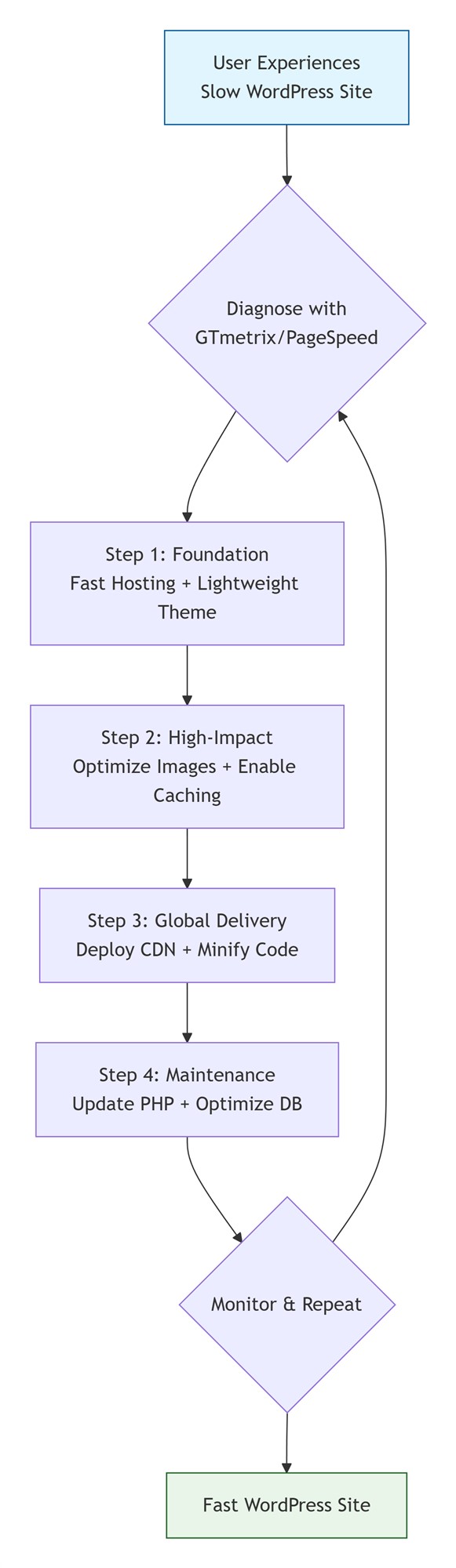
Is your website taking longer to load? Are you hearing complaints about speed, or seeing your search rankings stagnate? Site performance directly impacts your traffic, conversions, and reputation. With so much advice available, where should you actually start?
This guide answers the core questions about WordPress speed and provides a clear, actionable framework for improvement.
Quick Answers to Common Questions
How fast should my site load in 2026?
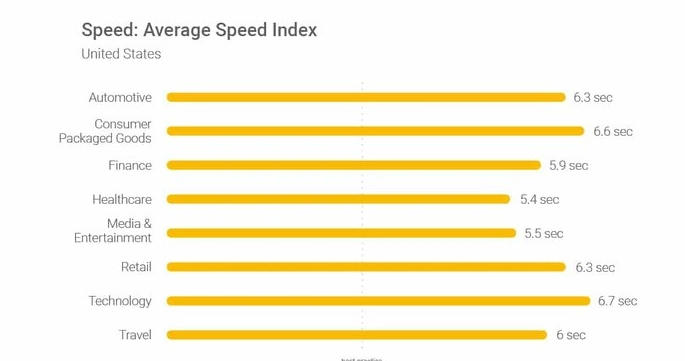
The current benchmark is for pages to load in under 3 seconds, especially on mobile. Bounce rates increase significantly beyond this point, and achieving under 2 seconds is even more competitive. This refers to real-world user experience, not ideal lab data.
Why does my site feel slow?
Perceived speed depends on multiple factors: the user’s location, their network (4G/5G/broadband), their device (high-end PC vs. old phone), and your site’s own resource size and number of requests. You need to focus on performance across all these conditions.
Do I need to be a tech expert to optimize?
Absolutely not. Most significant speed gains come from intuitive tools and configurations, not deep coding. Understanding the core principles helps you make the right decisions, but the implementation can be handled by trusted plugins and hosting services.
Step 1: Accurate Diagnosis – What’s Your Site’s Current State?
Before optimizing, you must measure. Use these two essential tools:
GTmetrix: Provides detailed timelines, performance scores, and the crucial Waterfall Chart, showing the load order and duration of every resource (images, scripts, etc.).
Google PageSpeed Insights: Analyzes user experience and Core Web Vitals, offering specific improvement suggestions.
How to Read the Diagnosis:
Focus on the longest bars in the Waterfall Chart—these are your “bottlenecks.” Common issues are: oversized images, excessive HTTP requests, render-blocking JavaScript/CSS, and slow server response time.
Step 2: Implement the Six Core Optimization Strategies
Follow this priority order for the best return on your effort.
1. Build on a Solid Foundation: Choose Reliable Hosting & Theme
Hosting is Critical: Cheap shared hosting is often the primary bottleneck. Look for:
Modern Software: Does it offer the latest PHP version (PHP 8.0+ is excellent for speed)?
Server Location: Is it geographically close to your primary audience?
Adequate Resources: Does your plan provide sufficient CPU/RAM for your traffic?
Use a Lightweight Theme: Avoid bloated themes packed with unnecessary features, scripts, and styles. A lean, well-coded theme is the foundation of a fast site.
2. Tackle the Biggest Burden: Optimize Your Images
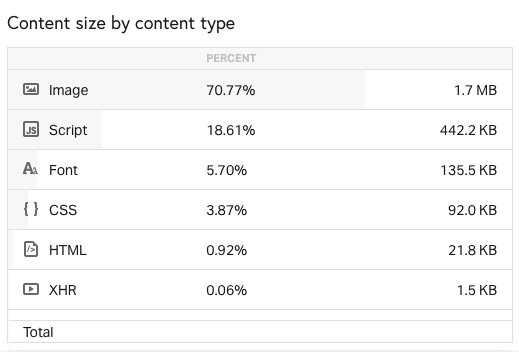
Images often make up over 60% of a page’s weight. Optimize in three steps:
Correct Dimensions: Resize images before upload to their maximum display width (typically 1200-1900px).
Effective Compression: Use a plugin (like ShortPixel, Imagify) or tool to compress files, balancing quality and size.
Modern Delivery: Enable Lazy Loading (images load as you scroll) and serve Responsive Images (correct size for each device).
3. Enable Caching: Make Repeat Visits Instant
Caching is one of the most effective speed technologies.
Page Caching: Stores a static copy of a generated page to serve instantly to subsequent visitors.
Browser Caching: Stores static resources (CSS, JS, images) on a user’s device for repeat visits.
Plugins like W3 Total Cache or WP Rocket make configuration straightforward.
4. Accelerate Global Access: Deploy a Content Delivery Network (CDN)
A CDN stores copies of your static files (images, CSS, JS) on a global network of servers. Users download from the nearest location, drastically reducing latency. For sites with an international audience, a CDN like Cloudflare is essential.
5. Streamline Code: Reduce Bloat & Blocking
Audit Plugins: Deactivate and delete unused plugins. Each can add HTTP requests and database queries.
Minify & Combine Files: Use a plugin to compress CSS/JavaScript files and combine multiple small files.
Manage Fonts: Load third-party fonts (e.g., Google Fonts) sparingly, or consider hosting common fonts locally.
6. Stay Updated: Ensure Software Efficiency & Security
Always run the latest versions of WordPress core, your theme, plugins, and PHP 8.0+. Updates fix vulnerabilities and often include performance improvements.
Step 3: Advanced Tuning & Ongoing Maintenance
After the core steps, consider these for further gains:
Optimize Your Database: Regularly clean up post revisions, spam comments, and other overhead.
Improve Server Efficiency: Enable Gzip compression, use the HTTP/2 protocol, and configure OPcache.
Mitigate Third-Party Scripts: Load analytics, social media widgets, etc., asynchronously.
Choose a Faster DNS Provider: DNS lookup speed affects initial connection time.
Conclusion: Your Optimization Roadmap
Don’t try to do everything at once. Follow this sequence:
Immediate Actions: Choose performance-oriented hosting, enable basic caching, and aggressively optimize images.
Quick Follow-ups: Deploy a CDN, audit and update all plugins/core files.
Fine-tuning: Analyze the Waterfall chart to tackle remaining JS/CSS blocking issues and optimize your database.
Website speed optimization is not a one-time task but an ongoing process. Test regularly (e.g., quarterly) with tools like GTmetrix, monitor changes, and adapt as technology evolves. A fast website delivers a better user experience, higher search rankings, and ultimately, improved business results.