You’ve crafted compelling content and chosen the perfect images, but your WordPress site still isn’t ranking as expected. Could unoptimized images be the culprit? In modern SEO, images are not just decorative; they are critical elements that search engines use to understand your content and assess user experience. Neglecting image optimization can mean missing out on valuable traffic from image search and harming your core web vitals.
This comprehensive guide will walk you through the 12 essential steps to fully optimize your WordPress images for SEO. By following this actionable checklist, you’ll transform your images into powerful assets that boost your rankings, speed up your site, and drive more organic traffic.
Why Image SEO is Non-Negotiable for WordPress Sites
Image SEO is the process of optimizing your website’s images so that they are easily discovered, understood, and indexed by search engines while providing an excellent experience for users. For WordPress users, this is especially important because the platform’s flexibility can lead to image-heavy pages that, if not optimized, slow down your site and hurt your rankings.
The benefits are twofold:
Direct Traffic Gains: Optimized images can rank in Google Images, bringing in additional visitors.
Improved Core Web Vitals: Properly sized and compressed images drastically improve loading times, which is a key factor for Google’s Core Web Vitals (especially LCP—Largest Contentful Paint). A faster site ranks better and keeps users engaged.
Ignoring image SEO means leaving traffic on the table and starting at a disadvantage in the competitive search landscape.
The Complete WordPress Image SEO Checklist: 12 Key Tasks
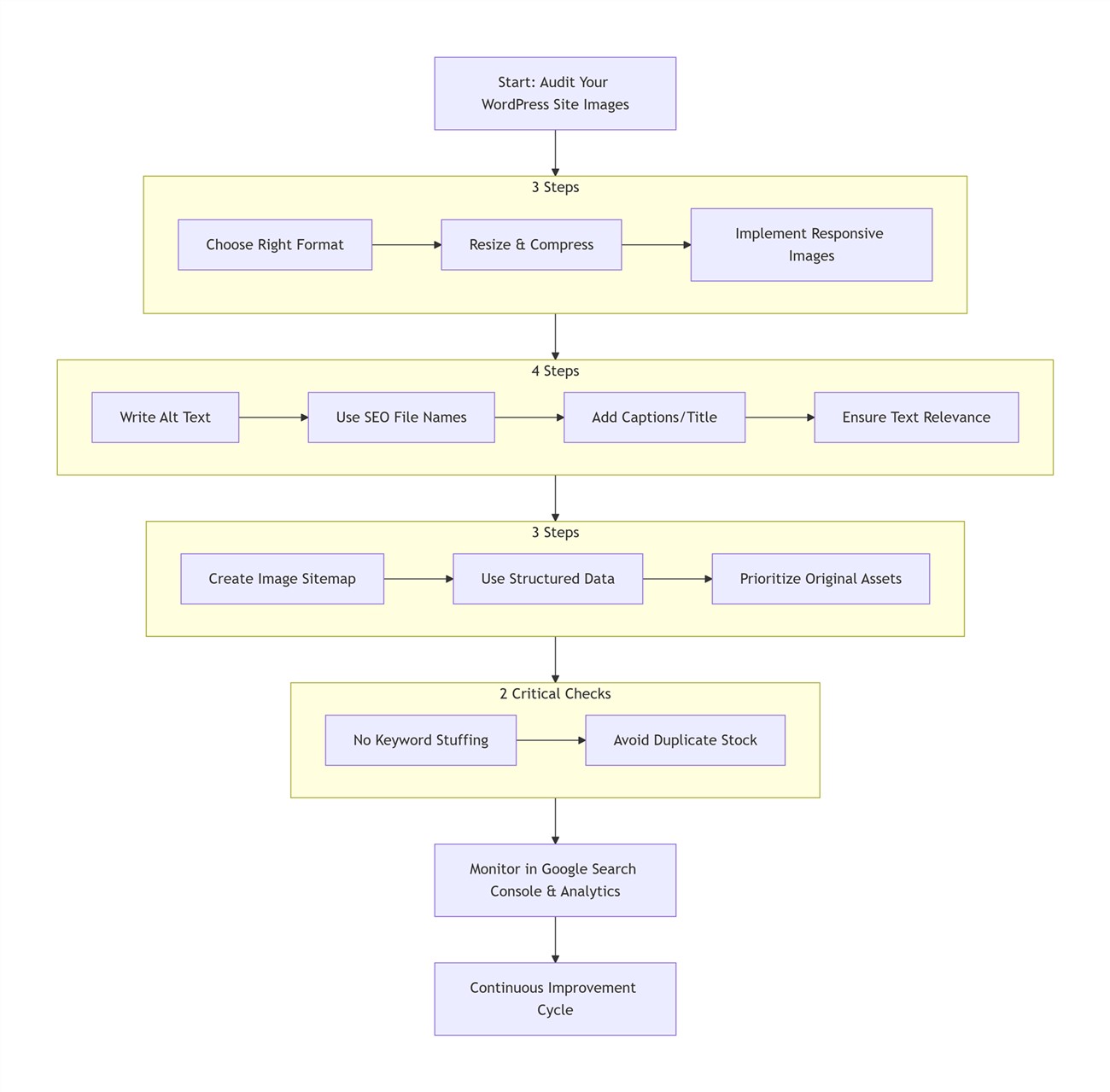
This checklist is divided into three tiers, covering technical foundations, content and context, and advanced strategies, plus critical pitfalls to avoid.
Tier 1: Foundational Technical Optimization (3 Steps)
Choose the Right Image Format
Action: Select the most efficient format for each image. Use WebP for photographs and complex images (with a fallback for older browsers), JPEG for general photos, PNG for graphics with transparency, and SVG for logos and icons.
Why it matters: Different formats have different compression capabilities. Choosing the right one ensures the best balance of quality and file size.
Resize and Compress Images Before Upload
Action: Never upload huge images straight from your camera. Resize them to the maximum dimensions they will be displayed on your site (e.g., 1200px wide for a full-width container) and then compress them using a tool like ShortPixel, TinyPNG, or Squoosh.
Why it matters: Oversized images are the number one cause of slow loading. This step directly improves your LCP score.
Implement Responsive Images in WordPress
Action: Ensure your theme supports responsive images. Use WordPress’s built-in
srcsetfunctionality or a plugin to serve different image sizes to different devices. Check that your theme generates multiple thumbnails.Why it matters: Mobile users shouldn’t have to download desktop-sized images. Responsive images improve mobile experience and Core Web Vitals.
Tier 2: Content & Context Optimization (4 Steps)
Write Descriptive Alt Text for Every Image
Action: Fill the alt text field with a concise, accurate description of the image’s content and purpose. Include your keyword if it fits naturally, but avoid stuffing.
Why it matters: Alt text is essential for accessibility (screen readers) and is a primary signal for search engines to understand the image.
Use SEO-Friendly File Names
Action: Rename your image files before uploading. Use descriptive, hyphen-separated words (e.g.,
chocolate-chip-cookies.jpg) instead of default names likeDSC_1234.jpg.Why it matters: File names give search engines additional context about the image subject.
Add Context with Captions and Title Attributes
Action: Use captions (the
figcaptiontag or WordPress caption field) to provide extra information that enhances the content. The title attribute (displayed on hover) can be used for supplementary details, though its SEO value is minimal.Why it matters: Captions are highly visible and can improve user engagement and understanding, which indirectly benefits SEO.
Ensure Image Relevance to Surrounding Text
Action: Place images close to the text that discusses the same topic. The image should complement and be referenced by the content around it.
Why it matters: Search engines use the surrounding text to determine the image’s relevance to the page’s topic. Strong alignment reinforces topical authority.
Tier 3: Advanced & Strategic Optimization (3 Steps)
Create and Submit an Image Sitemap
Action: Use an SEO plugin like Yoast SEO or Rank Math to automatically include images in your XML sitemap. Then, submit the sitemap to Google Search Console.
Why it matters: An image sitemap helps search engines discover all your images, especially those loaded by JavaScript or in galleries.
Use Structured Data for Images (When Applicable)
Action: For specific image types (like product images, recipes, or articles), implement appropriate structured data (Schema.org) to help search engines display rich results.
Why it matters: Structured data can lead to enhanced listings in search results, potentially increasing click-through rates.
Prioritize Original Visual Assets
Action: Whenever possible, use original photos, custom infographics, or uniquely edited images. If you must use stock photos, modify them significantly to stand out.
Why it matters: Original images are more likely to attract backlinks and social shares, and they face less competition in image search.
Critical Pitfalls to Avoid (2 Steps)
Avoid Keyword Stuffing in Alt Text and Captions
Action: Write for humans first. Do not repeat keywords unnaturally in an attempt to game the system.
Why it matters: Keyword stuffing is a spam signal that can hurt your rankings and degrade the user experience.
Steer Clear of Duplicate Stock Photos
Action: Avoid using overly common stock images that appear on thousands of other sites. If you do, customize them with overlays, text, or filters.
Why it matters: Using the same images as everyone else makes it harder to rank in image search and fails to build a unique brand.
Summary: Turning Images into SEO Powerhouses on WordPress
Image optimization is not a one-time task but an integral part of your WordPress content creation process. By systematically working through these 12 steps—from technical adjustments to content enhancements and strategic moves—you ensure that every image contributes positively to your site’s SEO health.
The cumulative effect is significant: faster loading times that satisfy Core Web Vitals, improved relevance that boosts topical signals, and increased visibility in both image and traditional search results. This leads to more organic traffic and better user engagement.
Start today by auditing your existing images with these 12 points in mind, and make image optimization a standard step for all new content. Your rankings and your visitors will thank you.
Image SEO Implementation Process Flowchart