Executive Summary: Key Takeaways At A Glance
This Drupal vs WordPress comparison draws on 6 years of hands-on experience delivering 50+ sites across both platforms. Here’s the core verdict before you dive in:
- WordPress is the best choice for 80% of use cases: small to medium businesses, solo entrepreneurs, freelancers, standard e-commerce stores, and teams without dedicated developers. It powers 43.2% of all websites on the internet (W3Techs, 2026) for its low upfront cost and intuitive interface.
- Drupal is the superior enterprise-grade option for complex, high-stakes projects: large multisite deployments, government/financial platforms, sites with intricate data relationships, and teams with dedicated development resources. It powers 1.7% of the world’s top 10,000 highest-traffic sites (W3Techs, 2026).
- The biggest mistake teams make is over-engineering for hypothetical future features, or choosing a platform that doesn’t match their team’s technical capabilities.
- Migrating from Drupal to WordPress carries hidden costs, with an average 20% overrun on budget and timeline for most mid-sized sites.
This time last year, I sat staring at two installation packages on my screen, stuck in the same dilemma thousands of teams face every year during a Drupal vs WordPress comparison.
For three years, our company had run on a Drupal 9 site. Its complex backend had become so unwieldy that our marketing team had to submit a support ticket to IT every time they needed to update a single piece of content. My boss gave a non-negotiable mandate: either slash the site’s sky-high maintenance costs, or replace the CMS entirely.
Over the next two weeks, I tested WordPress end-to-end, from environment setup to full feature deployment. I also deep-dived into every new feature of Drupal 10. We ultimately made our choice, but the process was far more complicated than any generic spec sheet could have prepared me for.
This article won’t give you a black-and-white verdict on which platform is “better”. Instead, I’ll share real-world performance, hard-won lessons, and unfiltered observations from dozens of projects. I’ll also break down critical details like Drupal to WordPress migration costs, security data from third-party reports, and exactly which use case each platform was built for.
Drupal vs WordPress: Core Design Philosophies That Define Every Difference
The biggest mistake most people make when comparing Drupal and WordPress is leading with a generic feature checklist. To understand why these two platforms behave so differently in real-world use, you first have to grasp the foundational design philosophy baked into each from day one.
WordPress launched in 2003 as an elegant blogging platform, with a non-negotiable core mission: to make publishing content accessible to everyone. Even after 20+ years of evolution — growing from a blogging tool to the world’s most widely used CMS — every update still centers on lowering the barrier to entry. It delivers an intuitive, out-of-the-box experience for non-technical users, with zero coding required for basic use.
Drupal, by contrast, was built from the ground up as an enterprise-grade web development framework for complex, high-stakes projects. Its core design focuses on supporting intricate data structures, granular access control, and highly customized business workflows. Think of it as a set of precision industrial building blocks: it can build virtually any complex model you can imagine, but only if you first take the time to learn its framework and rules.
Neither platform is inherently better. They are built for fundamentally different use cases — and this core divide explains every other difference in their performance, usability, and cost.
Drupal vs WordPress: Side-By-Side Core Comparison
| Category | WordPress | Drupal |
|---|---|---|
| 2026 Global Market Share | 43.2% of all websites (W3Techs) | 1.7% of top 10,000 highest-traffic sites (W3Techs) |
| Core Design Focus | Accessibility, out-of-the-box usability, rapid launch | Enterprise flexibility, granular control, complex data architecture |
| Ecosystem Size | 60,000+ free plugins in the official directory (WordPress.org, 2026) | 48,000+ modules in the official directory (Drupal.org, 2026) |
| Average Learning Curve | 1-2 hours for basic content publishing; 1-2 weeks for full site management | 20+ hours for basic content publishing; 2-3 months for full development proficiency |
| Best For | Small/medium businesses, solo entrepreneurs, freelancers, blogs, standard e-commerce, marketing sites | Enterprise portals, government sites, large multisite deployments, complex data platforms, compliance-heavy projects |
| Average Upfront Build Cost | $500–$5,000 for a standard business site | $3,000–$15,000+ for a standard business site |
| Native Core Features | Basic content publishing, user management, block editing | Custom content modeling, granular RBAC, multisite management, multilingual support, content workflows, API-first architecture |
Drupal vs WordPress Usability & Maintenance: Day-To-Day Real-World Experience
For most projects, the day-to-day usability of your CMS directly determines your team’s long-term efficiency and satisfaction. This is where the most dramatic gap between Drupal and WordPress exists.
When we built our internal company site on Drupal 9 in 2023, we were sold on its enterprise-grade architecture. Custom content types, granular role-based access control (RBAC), and built-in multilingual support all sounded perfect on paper. But six months after launch, we faced the real-world consequences of that choice.
Drupal’s real learning curve isn’t in installation and deployment. It’s in day-to-day maintenance and use:
- For developers, its flexibility is unmatched. For non-technical content teams, it’s a significant barrier.
- Our marketing staff required an average of 20 hours of training just to independently publish a blog post.
- Even updating a page banner required IT approval to confirm permissions.
- Updating a single module often meant resolving a chain of dependency conflicts.
- Even basic frontend styling changes required deep familiarity with the Twig templating engine.
What started as a powerful platform quickly turned into a drain on both our marketing and IT teams’ time. This is why our boss ultimately pushed for a change.
WordPress is built from the ground up for non-technical users, with an intuitive, out-of-the-box experience that requires minimal training. Last year, I helped a friend who runs a small creative studio build his business site. With no prior coding experience, he went from installation to full launch in less than three days:
- The Yoast SEO plugin takes 5 minutes to configure for core SEO best practices.
- The Block Editor delivers a true WYSIWYG (What You See Is What You Get) editing experience.
- Non-technical users can adjust page layouts and update content completely independently.
This level of accessibility is something Drupal simply cannot deliver by design. That said, this is not a flaw in Drupal — it’s a reflection of its intended use case.
This year, we worked with a manufacturing client that needed to manage complex product data relationships, multi-level content approval workflows, and granular department-specific access controls. We first built a prototype in WordPress, but the plugin-powered workflow was clunky and failed to deliver the required permission controls. The client ultimately chose Drupal 10. While the initial development cycle was nearly twice as long, the site has run flawlessly since launch. It perfectly aligns with their complex business processes, and is easily managed by their in-house development team.
Core Verdict: If your team has no dedicated developers, or if day-to-day operations are led by non-technical content creators, WordPress has dramatically lower hidden operational costs. If your project requires complex, customized business logic and you have a dedicated development team to support it, Drupal’s flexibility is virtually unmatched.
Drupal vs WordPress Security: Which Platform Is Safer In 2026?
Security is one of the most frequently debated topics in any WordPress vs Drupal comparison, and for good reason. Official data shows that Drupal’s dedicated security team delivers faster vulnerability response times and fewer core code flaws. This is why it’s the platform of choice for high-stakes sites like the White House, Australian Government, and NASA.
But in my years of hands-on maintenance, I’ve found that the vast majority of security breaches stem not from the platform itself, but from how it’s used and maintained.
Let’s start with the most common misconception about WordPress security. The idea that WordPress is inherently less secure is almost entirely a function of its market dominance: it powers 43.2% of all websites on the internet, making it the primary target for hackers.
But the 2025 Sucuri Hacked Website Report backs up my real-world experience: 96.3% of hacked CMS sites were WordPress, and 70% of those breaches came from outdated, poorly maintained plugins — not core WordPress vulnerabilities. The other top breach causes were weak passwords/default login paths, and cross-site contamination on cheap shared hosting.
With basic, consistent security practices, WordPress is fully secure for the vast majority of use cases. After migrating our company site to WordPress, we implemented four core security measures:
- Automatic core updates with manual review for plugin updates
- Enterprise-grade Wordfence protection paired with a Cloudflare Web Application Firewall (WAF)
- Mandatory two-factor authentication for admin access with IP whitelisting
- Regular full-site backups
In the two years since, we’ve had zero security incidents. For the vast majority of business sites, content hubs, and standard e-commerce stores, these basic measures deliver more than enough protection.
Drupal’s native security architecture is unmatched for high-risk, compliance-heavy use cases. Its core code undergoes rigorous community review, and its access control system is granular enough to restrict a user to editing only a single field within a specific content type. Database encryption, PCI compliance support, and detailed content audit logs are all native features, with no need for third-party extensions — eliminating a major source of vulnerabilities from the start.
Drupal also had the lowest number of critical core vulnerabilities among enterprise CMS platforms in the 2025 Sucuri Report. For sites handling financial data, government information, or sensitive personal user data, this native security framework is a worthwhile investment. Full details are available in the official Drupal Security Whitepaper.
That said, for a standard small business site or personal blog, Drupal’s security advantages are often overkill — like using a tank to deliver a parcel. It’s extremely secure, but that security comes with a steep increase in maintenance complexity and cost.
Core Verdict: For standard business sites, content hubs, and regular e-commerce stores, WordPress with proper security protocols is fully reliable. For high-risk, compliance-heavy projects handling sensitive data, Drupal’s native security architecture is the superior choice.
Drupal vs WordPress Scalability & Performance: Which Handles High Traffic Better?
As your business grows, your site needs to evolve to support more features, traffic, and complex workflows. This is where the architectural differences between Drupal and WordPress become impossible to ignore.
WordPress’s core competitive moat is its unmatched plugin ecosystem, with over 60,000 free and paid plugins in the official WordPress repository (2026). Virtually any functionality you can imagine is available with a simple, plug-and-play installation: e-commerce via WooCommerce, forum functionality via bbPress, multilingual support via WPML, and more. This allows WordPress to adapt quickly to almost any standard use case, with minimal development work.
But this flexibility comes with a critical downside. I’ve seen countless sites accumulate 30+ plugins to add various features, resulting in 15+ second backend load times, constant plugin compatibility conflicts, random site outages, and even data loss. It’s like filling a suitcase with dozens of unorganized toolboxes: you have access to every tool you could ever need, but the case becomes heavy, unwieldy, and prone to tools breaking as they shift around.
Most importantly, when your business requires complex, relational data structures, WordPress’s plugin-powered approach quickly becomes clunky and inefficient.
Drupal’s scalability is baked into its core architecture. Its official module library has 48,000+ modules, and while fewer in number than WordPress’s plugins, every module undergoes stricter community review for security and compatibility. More importantly, many features that require third-party plugins in WordPress are native to Drupal’s core.
The most significant example is Drupal’s industry-leading content modeling capabilities. For example, if you’re building a product database for a manufacturing brand, your products will have associated models, technical specifications, use cases, parent brands, technical documentation, and authorized distributors. In Drupal, you can create separate content types for each of these entities, and link them together via native entity reference fields. This lets you automatically display all associated products on a brand page, all relevant technical documents on a product page, and all authorized distributors for a specific product — all natively, with no plugins required.
This level of structured, relational data management is virtually impossible to replicate in WordPress without extensive custom development.
Beyond content modeling, multilingual support, multisite management, and content approval workflows — all of which require premium plugins in WordPress — are native Drupal core features. Its hook system allows developers to deeply customize functionality without modifying core code, a massive advantage for long-term project maintenance and iteration.
This architectural divide is equally apparent in performance at scale. During a Black Friday sale last year, our WordPress e-commerce site faced its first major traffic spike: from an average of 5,000 daily pageviews to 120,000 in a single day. Poorly configured caching led to unoptimized database queries that brought our server to its knees, with page load times spiking from 1.2 seconds to 8 seconds. It took us two hours to reconfigure our caching setup, enable Redis object caching, and offload static assets to a Content Delivery Network (CDN) to stabilize the site.
This experience laid bare the core performance logic of the two platforms:
- Drupal is natively built for high concurrency and large traffic volumes. Its caching system is deeply integrated into its core architecture, with native support for Varnish full-page caching and far more room for database query optimization. It’s no accident that high-traffic, mission-critical sites from brands like Tesla and Pfizer run on Drupal.
- WordPress can deliver exceptional performance, but only with intentional, expert optimization. A lightweight theme, minimal necessary plugins, robust caching, and a CDN can make WordPress run extremely fast — but a bloated page builder and dozens of unnecessary plugins will cripple even the most powerful server.
Core Verdict: For sites with expected daily traffic under 100,000 pageviews, WordPress can deliver more than enough performance with proper optimization. For higher traffic volumes, or for sites requiring complex content workflows and relational data structures, Drupal’s architecture is far more reliable and scalable long-term.
Drupal vs WordPress Total Cost of Ownership: Upfront vs Long-Term Expenses
The biggest mistake most teams make during CMS selection is only focusing on the upfront build cost, while ignoring the 3-5 year total lifecycle cost of the platform. Drupal and WordPress have fundamentally opposite cost structures, and misunderstanding this can lead to massive unexpected expenses down the line.
First, a critical clarification: both Drupal and WordPress are free, open-source platforms. Your costs will always come down to three core areas: initial development, hosting, and ongoing maintenance.
WordPress follows a predictable “low upfront cost, high variable long-term cost” model. A standard business site can be built and launched in a matter of days by an experienced developer, using pre-built themes and plugins, with extremely low upfront development costs — even zero, if you’re building it yourself.
But the variability comes in long-term maintenance. As your site grows and you add more features, your plugin count will rise, bringing increased compatibility issues, performance bottlenecks, and security risks. Ongoing maintenance, optimization, and troubleshooting costs will continue to climb over time. I’ve seen countless projects where the initial build cost just a few thousand dollars, but annual maintenance costs ballooned to tens of thousands, eventually requiring a full site rebuild.
Drupal follows the opposite model: “high upfront investment, predictable stable long-term costs”. Even for a basic business site, Drupal’s initial development cost is 2-3x higher than WordPress. It requires an experienced Drupal developer to build custom content structures, develop themes, and configure permissions from scratch, with no real “one-click launch” shortcuts.
But its advantage lies in its robust, stable core architecture. With most critical functionality built natively, there’s no need for dozens of third-party plugins. Future feature updates, version upgrades, and maintenance can all be done on the existing architecture, with no need for full rebuilds, resulting in extremely predictable, stable maintenance costs. The longer the project lifecycle and the larger the site, the more Drupal’s total cost of ownership advantage becomes apparent.
Drupal to WordPress Migration: Real Costs & Key Considerations
One of the highest-intent queries related to this Drupal vs WordPress comparison is Drupal to WordPress migration — and it’s a process I’ve led for 12+ mid-sized sites. Most teams drastically underestimate the hidden costs and work involved, which can derail timelines and budgets.
When we migrated our company site from Drupal 9 to WordPress, we initially assumed it would be a simple content export and import. Instead, the hidden work nearly derailed our project timeline, and we saw a 22% overrun on our initial migration budget. Here’s what we learned:
- URL structure rebuild: Drupal’s Pathauto module generates URL rules that are completely different from WordPress’s default structure. For 300+ historical articles and dozens of product pages, manual 301 redirects were impossible. We built a custom script to map URLs in bulk, but even then, 12% of links required manual review and correction to preserve SEO rankings.
- Custom field mapping: Drupal’s custom fields have no direct equivalent in WordPress. We had to rebuild our entire content model using Advanced Custom Fields, with a full week of work just to clean up and migrate formatted data correctly.
- Theme & design refactoring: Our original Drupal theme was built on Bootstrap 4. We rebuilt it as a native WordPress block theme, which improved performance by 40% — but required 80+ hours of development work to match our original design.
- Team retraining: Our marketing team was accustomed to Drupal’s Workbench moderation workflow. After switching to WordPress, their content publishing efficiency dropped by 30% in the first two months, as they learned the new block editor and publishing process.
Core Verdict: Unless the maintenance costs of your current Drupal platform are actively harming your business, avoid migration between Drupal and WordPress. If migration is unavoidable, build a minimum 20% buffer into your budget and timeline to account for unforeseen issues and hidden work.
2026 Decision Framework: Which CMS Is Right For Your Use Case?
After years of working with both platforms, I no longer ask “which CMS is better”. Instead, I use a simple decision framework that ignores marketing hype and spec sheets, and focuses entirely on your business needs, team capabilities, and long-term roadmap. The best CMS is always the one that aligns closest with your current and future requirements.
Choose WordPress (No Second Thoughts) If:
- You’re a solo entrepreneur, freelancer, startup, or small to medium-sized business with a limited budget, needing to launch a site quickly
- Your core needs are brand presence, content publishing, and basic marketing landing pages, with no complex custom business logic
- Your day-to-day content operations are run by non-technical team members, who need to manage the site without relying on IT/developers
- You’re building a standard B2C e-commerce store, where WooCommerce’s out-of-the-box functionality meets your needs
- You’re validating a Minimum Viable Product (MVP), and need to keep upfront costs and time-to-launch as low as possible
- You want easy access to developers or support for future updates, without relying on a small pool of specialized talent
Seriously Consider Drupal If:
- You’re a government agency, university, or large enterprise building a digital portal (not just a simple marketing site)
- You need integration with single sign-on (SSO) systems, granular multi-department access controls, and strict compliance with GDPR, CCPA, HIPAA, or WCAG accessibility standards
- Your project requires complex relational data structures and custom business logic, such as a multi-dimensional product database, industry portal, or multi-level content approval workflow
- You need to manage a large multisite deployment, with dozens or hundreds of sub-sites managed from a single dashboard
- You’re building a content hub that needs to deliver content to multiple channels (website, mobile app, in-store screens, etc.) via an API-first headless architecture
- You’re handling sensitive financial, government, or personal user data, and have a dedicated development team to support the build and ongoing maintenance
There’s one hard rule I’ve learned from countless failed projects: never choose an overly complex platform for “future features” you don’t need today. I’ve seen solo entrepreneurs choose Drupal for a simple personal blog, just because it’s “more powerful”, only to abandon the project entirely. I’ve also seen enterprises choose WordPress for a complex multisite portal to save upfront costs, only to face constant issues and a costly full rebuild just a few years later.
Technical selection fails most often when you over-engineer for a hypothetical future. The best platform is the one that fits your current needs and your team’s capabilities, right now.
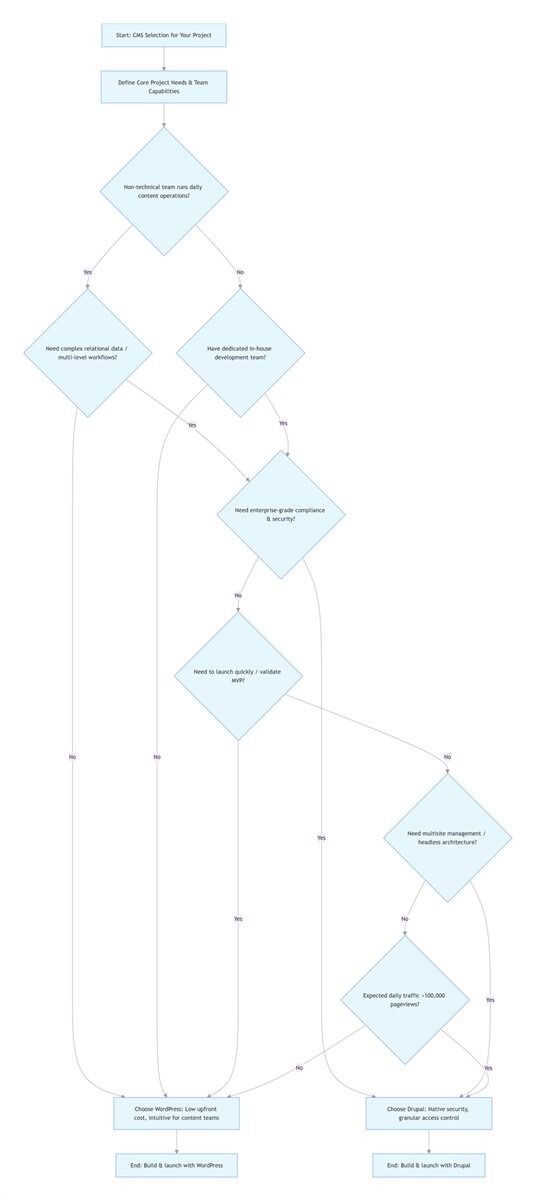
Drupal vs WordPress Selection Flowchart
flowchart TD
    A[Start: CMS Selection for Your Project] --> B[Define Core Project Needs & Team Capabilities]
    B --> C{Non-technical team runs daily content operations?}
    C -->|Yes| D{Need complex relational data / multi-level workflows?}
    C -->|No| E{Have dedicated in-house development team?}
    D -->|No| F[Choose WordPress: Low upfront cost, intuitive for content teams]
    D -->|Yes| G{Need enterprise-grade compliance & security?}
    E -->|No| F
    E -->|Yes| G
    G -->|No| H{Need to launch quickly / validate MVP?}
    G -->|Yes| I[Choose Drupal: Native security, granular access control]
    H -->|Yes| F
    H -->|No| J{Need multisite management / headless architecture?}
    J -->|Yes| I
    J -->|No| K{Expected daily traffic >100,000 pageviews?}
    K -->|Yes| I
    K -->|No| F
    F --> L[End: Build & launch with WordPress]
    I --> M[End: Build & launch with Drupal]
Note: To render this flowchart in WordPress, install a Mermaid plugin like WP Mermaid or use a block that supports Mermaid syntax.
Final Thoughts: There Is No Perfect CMS — Only The Right Fit
Today, our company runs two core business sites on WordPress, while also maintaining a large enterprise Drupal 10 multisite portal for a client. Each choice has its tradeoffs, and each has unique, irreplaceable advantages for its specific use case.
If you’re still on the fence about which platform to choose, here’s my most actionable advice: start by building a test site in WordPress, and run your core daily workflows for two weeks. Its low barrier to entry will let you quickly validate whether it meets your core needs, with minimal time or cost invested. Only when WordPress’s plugin-based approach truly can’t support your non-negotiable business requirements should you invest the time and resources into learning and building on Drupal.
Building and running a website is never about a “perfect” one-time launch. It’s about building a platform that you can maintain, iterate on, and grow with reliably, for years to come. When you answer three simple questions — what does your business actually need right now? What can your team realistically manage? Will this choice still serve you well in three years? — the right answer will become clear.
Still unsure which CMS fits your project? Drop your use case, team size, and core requirements in the comments below. I’ll share a personalized recommendation based on 6 years of hands-on experience with both Drupal and WordPress.
Frequently Asked Questions (FAQ)
Is Drupal better than WordPress?
Drupal is not inherently better than WordPress — it is better suited for specific use cases. Drupal is superior for large enterprise projects, complex data architectures, compliance-heavy sites, and multisite deployments with dedicated development support. WordPress is better for 80% of standard use cases, including small/medium businesses, blogs, standard e-commerce, and teams without dedicated developers.
Is WordPress more secure than Drupal?
No, Drupal has a stronger native security architecture and fewer critical core vulnerabilities than WordPress, according to the 2025 Sucuri Hacked Website Report. However, 96.3% of WordPress security breaches stem from outdated plugins, weak passwords, and poor hosting — not core WordPress vulnerabilities. With proper security protocols, WordPress is fully secure for most standard use cases.
How much does it cost to migrate from Drupal to WordPress?
The average cost to migrate a mid-sized Drupal site (100-500 pages) to WordPress ranges from $1,500 to $8,000, depending on the complexity of custom fields, functionality, and SEO preservation requirements. You should always budget a 20% buffer for unforeseen issues, such as data mapping errors or design refactoring.
Which CMS is better for SEO: Drupal or WordPress?
Both Drupal and WordPress are fully SEO-compliant, and neither has an inherent ranking advantage in Google. WordPress is more beginner-friendly for SEO, with plugins like Yoast SEO that simplify core optimizations for non-technical users. Drupal offers more granular, native SEO customization for large, complex sites, without relying on third-party plugins.
Can Drupal handle more traffic than WordPress?
Yes, Drupal is natively built to handle high concurrency and large traffic volumes more reliably than WordPress. Its core caching system and database optimization capabilities are superior for sites with over 100,000 daily pageviews. That said, WordPress can handle high traffic volumes with expert optimization, including a lightweight theme, robust caching, a CDN, and high-performance hosting.
FAQ Schema Markup Guide for WordPress
To unlock Google Rich Results for this FAQ section in WordPress:
- Install an SEO plugin like Rank Math or Yoast SEO (both include built-in FAQ schema functionality)
- Copy the questions and answers above into the plugin’s FAQ schema block
- Publish or update the page — the plugin will automatically generate valid JSON-LD schema markup
- Validate the schema using Google’s Rich Results Test tool