Last year, I spent 6 straight hours fixing a plugin conflict on a client's WordPress site. A routine update to a popular e-commerce extension broke the entire checkout flow, costing the business nearly $10,000 in lost sales in a single day. That was the moment I stopped just tweaking WordPress fixes, and started seriously researching reliable alternatives to WordPress for my clients and my own sites.
As someone who's built and migrated sites across 10+ platforms, from personal blogs to full-scale enterprise websites, I know exactly the frustration that leads people to search for WP alternatives. When I first got started, I jumped headfirst into WordPress, drawn in by its massive plugin ecosystem and unmatched flexibility. But the longer I used it, the clearer it became that it's not a one-size-fits-all solution. New users get overwhelmed by code tweaks and constant plugin conflicts, enterprise teams hit walls with security maintenance and limited scalability, and online store owners are stuck cobbling together functional stores with workarounds that often fail. In this guide, I'll break down the real needs behind this search, and share reliable, tested WordPress alternatives with zero hype—just honest, real-world feedback to help you find the perfect fit for your needs.
Why Are You Looking for Alternatives to WordPress?
If you're searching for site builders instead of WordPress, odds are you don't think WordPress is a bad platform – it just doesn't fit your current needs. After compiling my own hands-on experience and feedback from dozens of client migrations, I've found that people seek out WordPress replacements for four core pain points, all in pursuit of a solution that's better aligned, lower-maintenance, and matched to their skill level.
According to 2026 data from W3Techs, WordPress powers 43.2% of all websites on the internet – but its global market share dropped 0.8% in 2024, the steepest annual decline in half a decade. This shift isn't because WordPress got worse; it's because more users are realizing its flexibility comes with hidden costs that don't align with their goals.
Steep Learning Curve & Unnecessary Technical Barriers for New Users
Most people first choose WordPress because they hear it's free and flexible, only to realize the barrier to entry is far higher than expected. You have to source your own hosting, configure your domain, manually install themes and plugins, and even a small misstep can lead to plugin conflicts, broken layouts, or the dreaded White Screen of Death. When I first built a blog on WordPress, I spent 3 full days just fixing plugin compatibility issues, only to lose the entire site to a user error and have to rebuild from scratch.
For new users with no coding experience and no time to learn the ins and outs of site maintenance, WordPress's "flexibility" becomes a burden. At its core, this is why most beginners look for better CMS options: they want an out-of-the-box tool that works without technical hassle.
Mismatched Enterprise Needs: Gaps in Scalability & Security
WordPress has long been the go-to for small and medium-sized businesses, but as companies scale and digitize their operations, its limitations become impossible to ignore. I previously built a website for an international trading company on WordPress, and we quickly hit major roadblocks: WordPress requires plugins for multilingual sites—leading to messy workflows, access controls were too limited for cross-department collaboration, and security vulnerabilities were a constant risk.
The vast majority of WordPress security breaches stem from outdated third-party plugins and themes, and even one missed update can leave your site exposed to attacks. For global businesses with complex operational needs, the search for WordPress alternatives is all about finding an enterprise-grade platform that supports long-term growth, with built-in security and scalability.
Poor Native E-Commerce Support: Plugin Workarounds Fall Short
Countless online store owners try to build stores on WordPress using the WooCommerce plugin, only to find that the cobbled-together, plugin-reliant setup is clunky, error-prone, and unable to keep up with business needs. Common issues include payment gateway failures, inventory sync delays, and site slowdowns during peak traffic. A close friend of mine who runs a cross-border e-commerce business built his store on WordPress + WooCommerce, and during a high-traffic sale, plugin overload caused the site to crash, leading to hundreds of lost orders.
For e-commerce sellers, the core reason to seek WordPress replacements is simple: they want a platform with native, reliable e-commerce functionality, built to support multiple currencies, global payment gateways, and consistent performance.
Endless Maintenance Drains Your Core Focus
Backups, core updates, theme updates, plugin compatibility testing, performance optimization, and troubleshooting – these routine maintenance tasks are a massive cognitive burden for non-technical creators and business owners. I've seen countless people waste hours that should be spent on content creation, customer service, or product development on fixing WordPress bugs and plugin conflicts. For most users, this endless "technical debt" is the final push to look for a site builder instead of WordPress.
Tested & Trusted WordPress Alternatives for Every Use Case
Based on my hands-on experience and real-world client migration projects, I've rounded up the top WordPress alternatives for 2026, each with a clear use case, target user, and honest breakdown of pros and cons. Every option on this list is one I've personally built and tested on, with no overhyped claims. Each section opens with a clear, concise verdict to help you scan quickly.
Wix: Best No-Code WordPress Alternative for Beginners Beginner Friendly
Wix is the easiest out-of-the-box site builder for new users, with zero coding required and a fully hosted setup that eliminates all technical maintenance.
If you're a complete beginner looking to build a personal blog, portfolio, or small business brochure site without touching a single line of code or dealing with hosting, Wix is the perfect WordPress alternative for you. After my first disastrous WordPress build, I rebuilt my personal blog on Wix, and the process was night and day: the intuitive drag-and-drop editor requires no coding skills, and there are 900+ pre-built, industry-specific templates you can customize with your own text and images to launch in hours.
Wix's key advantages are clear: it has native responsive design, so your site automatically adapts to mobile and desktop with no extra tweaks; built-in SEO tools for keyword optimization, sitemap generation, and search engine submission, all with one-click functionality. Pricing: Free plan available (with Wix branding); paid plans start at $16/month for a custom domain and no branding. It does have limitations, however: it has far less customizability than WordPress, and site migration is extremely difficult if you want to switch platforms later. It's ideal for simple sites, but not built for complex business needs.
Webflow: Best WordPress Alternative for Designers & Brand Websites Design Focused
Webflow is the top visual site builder for designers and brands, offering pixel-perfect design control without the need for manual coding.
If you're a designer, creative agency, or brand that needs pixel-perfect control over your site's visual design and interactions, Webflow is a far better fit than WordPress. Last year, I helped a design studio build their brand website on Webflow, and it solved every pain point they'd faced with WordPress: no more bloated page builders, no more CSS workarounds to get the exact layout they wanted, and clean, lightweight code that loads fast.
Webflow's core strength is its visual coding functionality: it lets you design with the precision of hand-written HTML and CSS, but through an intuitive drag-and-drop interface, with no bloated code left behind. The sites I've built on Webflow consistently score 90+ on Google PageSpeed Insights, a result that would take hours of optimization on a WordPress site. Pricing: Free plan available (with Webflow branding); paid plans start at $18/month for a custom domain and CMS functionality. Its limitations include a steeper learning curve for users with no design experience, and higher costs for large-scale content sites.
Ghost: Best WordPress Alternative for Writers & Newsletter Creators Creator First
Ghost is the most focused WordPress alternative for content creators, with a clean writing experience and native membership & newsletter functionality built in.
In early 2024, I migrated my established personal blog – which I'd run on WordPress for 4 years – to Ghost, and it completely changed how I create content. I stopped wasting time troubleshooting plugin updates and maintenance, and started focusing 100% on writing – which is the whole point of a blog in the first place. Ghost is built exclusively for content creators, with none of the bloated functionality that weighs down WordPress sites.
Its standout features include a distraction-free Markdown editor, native membership and paid subscription tools, and built-in newsletter sending – no need for third-party tools like Mailchimp or Memberful, which means no more plugin conflicts. Unlike Substack, Ghost gives you full ownership of your content, audience data, and brand identity – critical for long-term business growth. Ghost sites also load significantly faster than optimized WordPress sites, with clean, SEO-friendly code out of the box. Pricing: Self-hosted version is free; fully hosted plans start at $11/month. Its main limitation is a much smaller theme and plugin ecosystem than WordPress, so complex customizations require development work.
Shopify: Best WordPress Alternative for E-Commerce Sellers E-Commerce Native
Shopify is the most reliable all-in-one e-commerce platform for online store owners, with native end-to-end sales functionality and minimal technical maintenance.
If you're running a cross-border store or direct-to-consumer (DTC) brand, there's no better WordPress alternative than Shopify. Most of the DTC brand owners I work with have migrated from WordPress + WooCommerce to Shopify, and the number one reason is always the same: it's reliable, and it lets them stop worrying about site maintenance and focus on growing their business.
As the world's largest SaaS e-commerce platform, Shopify has native, end-to-end e-commerce functionality built in, from product listings and order management to payment gateway integrations and logistics partnerships – no extra plugins required. It also supports 3,000+ app integrations for custom marketing, analytics, and operational needs, with native multi-currency and global payment gateway support for sellers operating worldwide. While Shopify's advanced plans come at a premium, the cost is often offset by the time saved on technical maintenance and the higher conversion rates from its optimized checkout flow. Pricing: Basic plan starts at $29/month, with transaction fees waived on $79+/month plans. Its main limitation is weaker content management functionality than dedicated CMS platforms, making it less ideal for content-heavy sites.
Drupal 10: Best Open-Source WordPress Alternative for Enterprise & Large Sites Enterprise Grade
Drupal 10, the latest stable release, is the most secure, scalable open-source CMS for large, content-heavy sites, with enterprise-grade access controls and content architecture tools.
If you need to build a large-scale content site – such as a government portal, educational institution website, or enterprise news hub – with complex content architecture and granular access controls, Drupal 10 is a far better fit than WordPress. I previously worked on a website migration for a large educational institution, where the existing WordPress site couldn't handle its massive content library, complex user roles, and multi-department workflows. We migrated to Drupal, and it solved every single content management pain point we were facing.
Drupal 10 is renowned for its industry-leading security, which is why it's the platform of choice for governments, educational institutions, and large organizations worldwide, with a mature vulnerability response system. It offers unmatched customizability, with a more rigorous module system than WordPress, built for long-term scaling and upgrades, and can easily handle millions of pieces of content and high user volumes with far more stability than WordPress. Pricing: Free, open-source software; hosting and development costs vary based on project scope. Its major downside is its extremely steep learning curve: it requires advanced technical and development skills to build and maintain, making it unsuitable for beginners or small sites.
At a Glance: WordPress Alternatives Comparison Table
To help you compare options quickly, here's a breakdown of each platform's core details:
Frequently Asked Questions (FAQ)
Is WordPress still good in 2026?
WordPress is still a powerful CMS in 2026, but it's only a good fit if you have the technical expertise to maintain it, or the budget to hire someone to manage it for you. For most non-technical users, small business owners, and content creators, a dedicated hosted site builder will be a more efficient, less stressful option.
Which is better for SEO: WordPress or Webflow?
Both platforms can deliver strong SEO results, but Webflow has an edge for most users: it generates clean, lightweight code out of the box, with no bloat from plugins, so sites consistently load faster – a key Google ranking factor. WordPress can be optimized for strong SEO, but it requires multiple plugins and ongoing maintenance to match Webflow's out-of-the-box performance.
What is the best free alternative to WordPress?
The best free alternative to WordPress depends on your needs: Wix offers a fully functional free plan for simple sites, Ghost has a free self-hosted version for bloggers, and Drupal 10 is a free, open-source CMS for enterprise-level projects. For most users, Wix's free plan is the easiest to get started with, no hosting or technical skills required.
Can I migrate my WordPress site to another platform?
Yes, you can migrate your WordPress content to almost every major site builder. Most platforms (including Wix, Webflow, and Ghost) offer built-in WordPress importer tools to transfer your posts, pages, images, and user data. The complexity of the migration will vary based on how many custom plugins and features your WordPress site uses.
Final Thoughts: How to Choose the Right WordPress Alternative for You
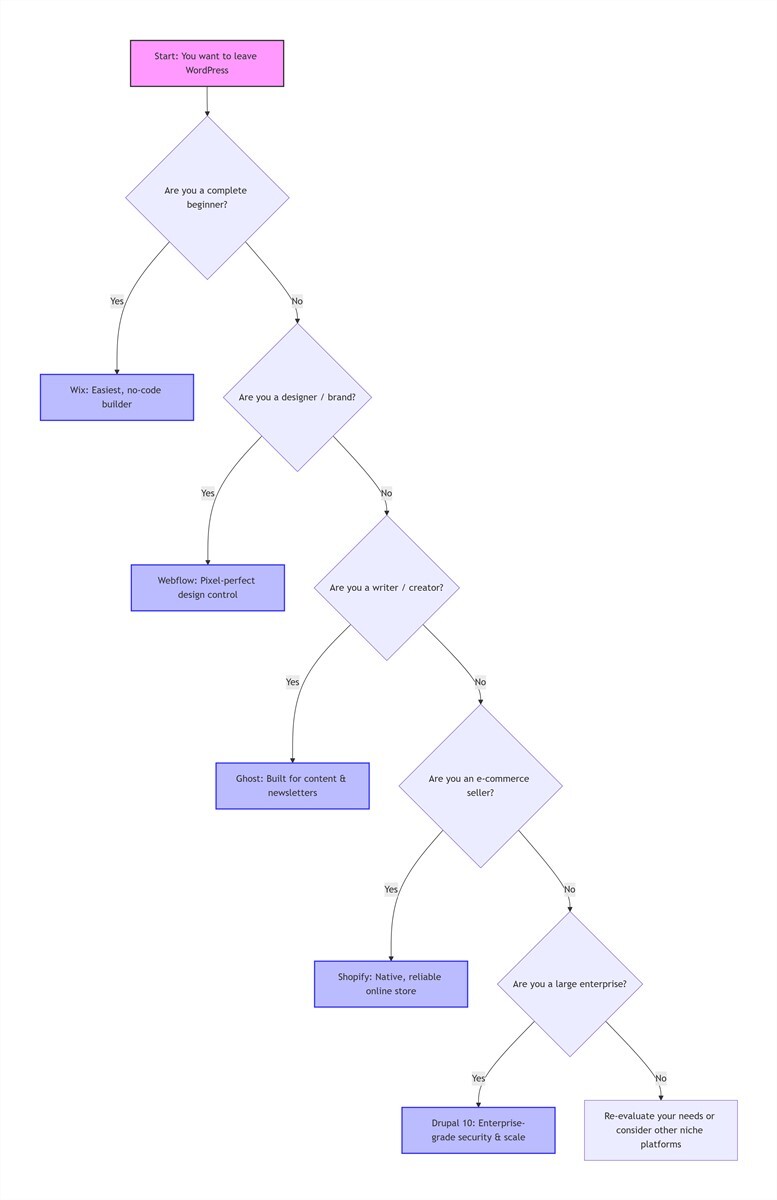
At the end of the day, there is no single "best" WordPress alternative – only the one that's right for you and your unique needs. Based on my years of hands-on experience and client migrations, here's a simple framework to guide your decision:
- For complete beginners building a simple, brochure-style site: Choose Wix
- For designers and brands needing pixel-perfect visual control: Choose Webflow
- For writers, bloggers, and newsletter creators focused on content: Choose Ghost
- For e-commerce sellers focused on growth and operational efficiency: Choose Shopify
- For enterprise teams building large, secure, content-heavy sites: Choose Drupal 10
About the Author
Alex Carter
Former WordPress developer with 8+ years of experience building and migrating websites for small businesses and enterprise clients. Now a CMS consultant helping businesses choose the right platform for their goals, without the unnecessary technical hassle.
Ready to make the switch? Start with Wix's free plan to test the waters, or schedule a free 15-minute CMS consultation if you're unsure which platform fits your business. No matter which tool you choose, the goal is to pick a platform that fades into the background, so you can focus on what matters most: creating content, serving your customers, and growing your business.