


Summary
In early 2025, I took over an outdoor gear e-commerce site built on WordPress. The site ranked #4 on Google for its core keyword, with over 120,000 monthly impressions—yet the click-through rate was stuck at 2.1%. The team had been focused entirely on chasing higher rankings, but traffic wouldn’t budge. After digging in, I realized the problem wasn’t ranking at all. It was what users saw in the search results: titles, meta descriptions, and URLs that gave them no reason to click. Over 30 days of initial optimization followed by sustained work, I lifted CTR to 7.8%, and after six months of continuous refinement, it stabilized at 11.6%. Organic traffic nearly tripled. This article walks through what I did and what I learned along the way.
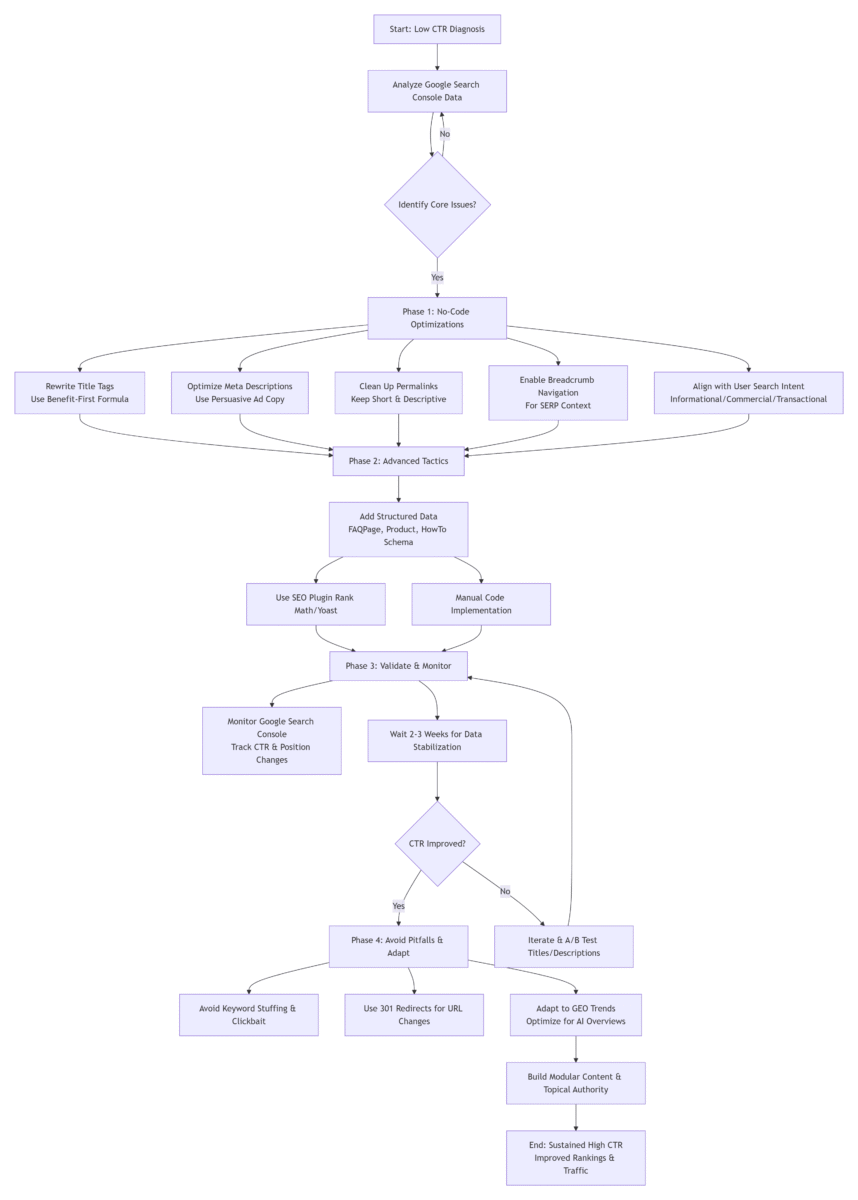
This article follows a funnel reading path: Start with a real case conclusion (2.1%→11.6% CTR), dive into depth (tactics/pitfalls), and end with current trends (GEO) to guide your next steps.
🎯 AI Summary Block
Core Problem: WordPress sites with strong Google search rankings fail to convert impressions into traffic due to low click-through rate (CTR), which further triggers ranking drops as Google interprets low CTR as poor user satisfaction.
Solution: WordPress-specific CTR optimization, including metadata rewriting, permalink cleanup, breadcrumb enablement, and schema.org structured data implementation, with both no-code and advanced code-based solutions.
Expected Results: 30%-50% CTR lift with foundational optimizations, sustained improvements up to 450% over six months (2.1%→11.6%), paired with 2-3 position ranking improvements on Google.
Target Audience & Difficulty: WordPress site owners, e-commerce operators, SEO professionals; difficulty ranges from beginner (no-code) to advanced (developer-level).
TL;DR: Here is the bottom line after 12 years in the field: To boost your WordPress site’s Google click-through rate from 2.1% to 11.6%+, rewrite titles and meta descriptions using the “[Number/Year] + User Benefit + Core Keyword + Context” formula, add structured data (FAQPage, Product) via SEO plugins like Rank Math, and align your content with user search intent across informational, commercial, navigational, and transactional queries. Implement no-code foundational tactics first, then layer on advanced schema and GEO adaptations. This case study shows that a structured, intent-focused approach can lift CTR by 450%+ and improve rankings by 2-3 positions within six months.
📑 Table of Contents
- 1. Why Your WordPress Site Ranks but Doesn’t Get Clicks?
- 2. What Are You Really Competing Against on the Search Results Page?
- 3. What No-Code Tactics Can Boost WordPress CTR by 80%?
- 4. How Can Advanced Tactics Like Structured Data Make Your Listing Stand Out?
- 5. How to Validate CTR Optimization Results with Google Search Console?
- 6. What Common Pitfalls Should You Avoid?
- 7. What’s the New Reality in 2026: The Rise of GEO?
- 8. What Recommendations Should You Follow Based on Your Site’s Stage?
1. Why Your WordPress Site Ranks but Doesn’t Get Clicks?
Let me start with a real example.
In early 2025, a client running a WordPress + WooCommerce outdoor gear store came to me frustrated. Their core keyword “waterproof hiking boots” was ranking #4 on Google, pulling over 120,000 impressions per month. But traffic? Barely 2,600 clicks.
When I opened Google Search Console, the issue was obvious.
The page title was “Waterproof Hiking Boots – Outdoor Gear Store.” The meta description read: “We offer a wide variety of waterproof hiking boots for men and women. Shop now for the best prices.”
Put yourself in the user’s shoes. You search for “waterproof hiking boots” and see ten results. One tells you it’s an outdoor gear store that sells boots. Another says: “10 Best Waterproof Hiking Boots of 2025: Tested by Backpackers” with a description that reads: “We hiked 100 miles to find the most durable, comfortable boots. Here are our top picks.”
Which one are you clicking?
Ranking solves visibility. Click-through rate solves selection.
The deeper issue is that Google’s RankBrain algorithm tracks user behavior. If your page consistently underperforms the expected CTR for its position, Google interprets that as a sign that your result isn’t satisfying users—and gradually, your ranking drops.
2. What Are You Really Competing Against on the Search Results Page?
Many SEOs still think of the search results page as a list of ten blue links. In 2026, that’s no longer accurate.
According to 2026 CTR studies, traditional #1 organic results now see 19-26% CTR, while Featured Snippets capture 42.9% and AI Overviews 38.9% (First Page Sage 2026 CTR Study). A typical Google SERP today includes:
- Google Ads (usually 2–4 spots at the top)
- AI Overviews (generative search summaries that occupy significant space)
- People Also Ask (expandable Q&A boxes)
- Featured Snippets
- Image and video carousels
- Local packs (for location-based searches)
Traditional organic blue links often occupy less than half of the visible page.
What does this mean? Your competition isn’t just other websites—it’s also Google’s own features.
If your WordPress site is still showing up as a simple headline with two lines of text, without any rich elements like star ratings, pricing, or FAQ accordions, you’re effectively invisible in a crowded SERP.
3. What No-Code Tactics Can Boost WordPress CTR by 80%?
You don’t need to write code to get most of the benefit. WordPress also offers native tools—like custom permalink settings and theme template tweaks—to support these optimizations. A solid SEO plugin is your best starting point. While I prefer Rank Math for its free schema support, Yoast SEO (free) offers solid title and meta description controls, though advanced schema requires the Pro version. Choose one and stick with it.
3.1 How to Rewrite Title Tags to Maximize WordPress Google CTR?
Key takeaway: Your title tag is the single most influential element in whether someone clicks.
I used to rely on the default plugin format: %post_title% – %sitename%. That puts the most important information at the end, where it often gets truncated on mobile.
My current title formula:
[Number/Year] + [User Benefit] + [Core Keyword] + [Context/Limiter]
| Page Type | ❌ Before | ✅ After |
|---|---|---|
| Product | Waterproof Hiking Boots – Outdoor Gear Store | 2025 Field Test: 5 Most Durable Waterproof Hiking Boots | 100-Mile Wear Test Results (Updated for 2026) |
| Blog Post | WordPress Speed Optimization Tips | WordPress Running Slow? 3 No-Code Fixes That Cut Load Time by 70% (2025 Update) |
| Category | Camping Gear – Shop Now | Expert-Tested: 10 Best Camping Tents, Sleeping Bags, and Stoves (Full Comparison) |
Page-type specific guidelines:
- For transactional product pages: Prioritize urgency, discount details, or availability in the first 30 characters to capture ready-to-buy users (e.g., “Limited Stock: 5 Best Waterproof Hiking Boots…”).
- For informational blog posts: Lead with the problem you solve to match user search intent (e.g., “WordPress Running Slow? Here’s How to Fix It in 3 Steps”).
Guidelines:
- Put the benefit first. In the first 50 characters (mobile-first: aim for crucial info in first 50), users should understand why clicking benefits them.
- With 62.73% of global website traffic coming from mobile devices as of Q2 2025 (Statista 2025), and over 70% of Google search queries happening on mobile, always preview how your titles appear on smartphones. Truncated titles kill CTR.*
- Avoid keyword stuffing. One core keyword per title, used naturally.
*Note: The 62.73% figure refers to global web traffic share; the 70%+ figure refers specifically to Google search queries, where mobile dominance is even higher.
3.2 How to Optimize Meta Descriptions for Higher Clicks?
Key takeaway: Meta descriptions are your free ad copy—use them to persuade.
Many sites leave the meta description blank, letting Google pull the first few sentences of the article. That often results in generic text like “Welcome to our site…”—which does nothing to encourage clicks.
My meta description structure:
[User pain point / question] + [Solution / unique value] + [Call to action]
Example:
Before (auto-generated): “Waterproof hiking boots are essential for any outdoor enthusiast. We offer a wide selection of brands including Merrell, Keen, and Salomon. Browse our collection today.”
After: “Tired of wet feet on the trail? We tested 15 waterproof hiking boots across durability, traction, and breathability to find the 5 best for serious hikers. See the full results.”
Guidelines:
- Stay within 155–160 characters to avoid truncation on desktop. For mobile, prioritize key information in the first 120 characters.
- Include the core keyword early—Google bolds it in the SERP, which increases visual prominence.
- Use specific numbers or claims (“tested,” “15 models compared”) to set expectations.
Troubleshooting: If Google ignores your custom meta description, see the troubleshooting tips at the end of this section for common fixes.
3.3 How to Structure Permalinks for Better Click-Through Rates?
Key takeaway: Clean, short URLs improve both CTR and user trust.
WordPress defaults to ?p=123, which is neither user-friendly nor click-friendly. I recommend setting Permalinks to “Post name” in Settings → Permalinks.
Then, before publishing, manually edit the URL slug:
| ❌ Bad | ✅ Good |
|---|---|
| /2025/03/26/waterproof-hiking-boots-comprehensive-guide-for-beginners | /waterproof-hiking-boots-tested |
| /best-wordpress-seo-tips-and-tricks-for-2026 | /wordpress-seo-ctr-guide |
Guidelines:
- Keep only the core keyword(s).
- Use hyphens, not underscores or spaces.
- Keep it as short as possible while remaining descriptive.
Safety Note: Never modify the permalink of a page that is already indexed and ranking on Google, unless you set up a 301 redirect from the old URL to the new URL. Failing to do this will result in 404 errors, lost ranking weight, and traffic drops. You can set up 301 redirects for free via Rank Math’s Redirection module or the Redirection WordPress plugin.
3.4 How to Use Breadcrumb Navigation to Improve CTR?
Key takeaway: Breadcrumbs replace messy URLs with clear site structure in search results.
Rank Math and Yoast both include breadcrumb functionality. When enabled, Google often displays breadcrumbs instead of the raw URL in search results—for example, “Home > Outdoor Gear > Hiking Boots > Waterproof Boots Review.”
This gives users immediate context and builds trust.
3.5 How to Align with User Search Intent for Better CTR?
Key takeaway: If your content doesn’t match what the user intends to do, even a top ranking won’t get clicks.
Google’s 2026 algorithm categorizes searches into four primary intent types, and your title and meta description must signal alignment:
| Intent Type | User Goal | Title Strategy | Meta Description Strategy | Example Keywords |
|---|---|---|---|---|
| Informational | Learn something | “How to,” “What is,” “Guide” + benefit | Summarize the key takeaway or answer the core question upfront | “how to fix,” “what is,” “guide” |
| Commercial | Research before buying | “Best,” “vs,” “Review,” “Top 10” | Mention number of products tested, comparison criteria, or unique findings | “best,” “review,” “vs,” “top 10” |
| Transactional | Ready to purchase | “Buy,” “Discount,” “Price,” “Deal” | Highlight current price, availability, or limited-time offer | “buy,” “price,” “discount,” “deal” |
| Navigational | Find a specific site | Ensure brand name is clear and prominent | Reinforce the brand name and what users can expect on the site | “login,” “pricing,” “contact,” brand names |
Example: If a user searches “best waterproof hiking boots 2026” (commercial intent), a title like “Waterproof Hiking Boots – Our Store” will underperform. A title like “10 Best Waterproof Hiking Boots 2026: Expert Tested & Compared” signals commercial intent and earns more clicks.
4. How Can Advanced Tactics Like Structured Data Make Your Listing Stand Out?
Key takeaway: Rich results—star ratings, pricing, FAQs—dramatically increase CTR by making your listing visually dominant.
Structured data is based on schema.org, a universal vocabulary created and maintained by Google, Microsoft, Yahoo, and Yandex. As of 2024, over 45 million web domains use schema.org markup across 450 billion+ schema objects, making it the global standard for rich results. Google officially recommends using JSON-LD encoding for structured data, which is the format we use in this guide. For official documentation, refer to schema.org and Google Search Central’s Structured Data Guidelines.
The impact: In 2025, I added Product Schema (price, rating, availability) to all product pages on an e-commerce site. The average CTR for those pages went from 3.2% to 8.9%.
Why this matters for GEO: Schema.org structured data is a core foundation for Google AI Overviews to crawl and cite your content. Comprehensive FAQPage and HowTo schemas significantly increase your content’s chances of appearing in AI-generated search results.
4.1 How to Add Schema with an SEO Plugin?
Rank Math’s free version includes Schema support, while Yoast SEO requires Pro for advanced schema types. Both can get the job done—choose based on your budget and needs.
While editing a page with Rank Math, go to the Schema module and select the appropriate type:
- Blog posts → “Article”
- Product pages → “Product”
- Step-by-step guides → “HowTo”
- FAQ content → “FAQPage”
Fill in the required fields (price, rating, steps, etc.), save, and then validate your implementation following Google’s official workflow:
- First, use Google’s Rich Results Test to preview Google-specific rich results.
- Then, use the W3C Schema Markup Validator for full generic schema compliance checks.
This two-step validation process is Google’s recommended best practice for ensuring your structured data is properly implemented.
4.2 How to Manually Add FAQ Structured Data?
Sometimes the plugin templates aren’t flexible enough. If you need to add FAQ schema to specific posts, you can use code for precise control.
The following snippet adds FAQPage schema to specific post IDs:
// Add custom FAQ structured data to specific posts
// Validate with Google's official Rich Results Test
add_action('wp_head', 'custom_faq_structured_data', 999);
function custom_faq_structured_data() {
    // Priority 999 ensures this schema loads after your SEO plugin's code, preventing overwrites and conflicts
    // Define target post IDs for FAQ schema (find IDs in the URL when editing a post)
    $target_post_ids = array(123, 456);
    if (is_single($target_post_ids)) {
        ?>
        <script type="application/ld+json">
        {
            "@context": "https://schema.org",
            "@type": "FAQPage",
            "mainEntity": [
                {
                    "@type": "Question",
                    "name": "Can I improve WordPress CTR without coding?",
                    "acceptedAnswer": {
                        "@type": "Answer",
                        "text": "Yes. SEO plugins like Rank Math or Yoast allow you to optimize titles, meta descriptions, and add structured data without writing any code. Most sites see meaningful improvements within 30 minutes of work."
                    }
                },
                {
                    "@type": "Question",
                    "name": "How soon will I see results after making changes?",
                    "acceptedAnswer": {
                        "@type": "Answer",
                        "text": "Google typically re-crawls pages within 3–7 days. I recommend waiting about two weeks after changes before evaluating CTR data in Google Search Console."
                    }
                }
            ]
        }
        </script>
        <?php
    }
}
Safety note: Always back up your theme’s functions.php file or use a snippet management plugin like Code Snippets. To find a post ID, look at the URL in your browser’s address bar while editing a post—it will show post=123. If anything breaks, deleting the added code immediately restores normal functionality.
5. How to Validate CTR Optimization Results with Google Search Console?
Key takeaway: Measure before you optimize, and let data guide your next moves.
Here’s a step-by-step process to track CTR improvements:
Step 1: Establish a baseline
- Log in to Google Search Console.
- Navigate to Performance → Search results.
- Select a 3-month period before your optimization work.
- Filter by Pages to see individual page performance.
- Record three baseline metrics: overall site CTR, CTR for your target keywords/URLs, and average position.
Step 2: Make your changes
- Implement the title, meta description, and schema updates described above.
- Note the date of implementation.
Step 3: Wait for data
- Allow 2–3 weeks for Google to re-crawl your pages and for data to stabilize.
- Use GSC’s date comparison feature to compare the post-optimization period against your baseline.
Step 4: Analyze the results
Look for these indicators:
| Indicator | Status | Icon |
|---|---|---|
| CTR for target pages increases | Aim for +30% vs. your pre-optimization baseline | ✅📈 |
| Average position remains stable/improves | Monitor weekly | 📊→📈 |
| Total clicks increase proportionally | Correlate with CTR | ✅🔢 |
Step 5: Iterate
- Identify pages that didn’t improve and test alternative titles/descriptions.
- Use GSC’s date range comparison to compare performance before and after optimization.
- Filter by query to see which keywords drive the most clicks and where CTR remains low.
- Use the performance report to track CTR trends over time.
6. What Common Pitfalls Should You Avoid?
Key takeaway: Even good tactics can backfire if applied incorrectly.
6.1 Keyword Stuffing in Titles
What I did: I used to think more keywords = better. I wrote titles like “Waterproof Hiking Boots, Best Hiking Boots, Hiking Boots Reviews – Outdoor Store.”
What happened: Users saw spam. CTR dropped. Google treated it as over-optimization, and rankings fell.
Lesson: One core keyword per title. Write for humans first.
6.2 Using Meta Descriptions as Keyword Lists
What I did: “Waterproof hiking boots, hiking boot reviews, outdoor gear, hiking shoes, trail footwear…”
What happened: No user reads that and thinks, “I should click this.”
Lesson: Write a complete sentence that answers “why click here?”
6.3 Clickbait That Mismatches Content
What I did: Wrote a title promising “Free WordPress Speed Course” but the page only had a basic checklist.
What happened: High bounce rate (85%+), short dwell time. Google demoted the page within weeks.
Another example: Title “Will WordPress Be Obsolete in 2025?” but the content only discussed minor version updates. Users felt misled, CTR dropped 40% in two weeks.
Lesson: Your title and meta description must deliver exactly what they promise. Trust is the foundation of sustained CTR.
6.4 Optimizing Without Validating
What I did: Early on, I’d rewrite titles and descriptions, then never check if they actually improved CTR.
What happened: Sometimes my “good” titles performed worse. I had no idea.
Lesson: Always check Google Search Console 2–3 weeks after changes. If CTR drops, revise and test again.
6.5 Running Two SEO Plugins
What I did: Installed both Rank Math and Yoast at the same time.
What happened: Both injected code into the page head, causing duplicate title tags, conflicting schema, and confused Google crawlers.
Lesson: Pick one SEO plugin. Stick with it.
6.6 Troubleshooting: Diagnosing Why Google Ignores Your Meta Descriptions
What I did: Spent hours crafting meta descriptions, only to find Google was still pulling random sentences from my articles in the search results.
What happened: My descriptions were generic, didn’t match the page’s core content, and didn’t answer the user’s search query. Google ignored them because they didn’t add value.
Common reasons Google ignores custom meta descriptions:
- The description doesn’t accurately reflect the page’s main content.
- It lacks the user’s search keyword (Google wants to show relevance).
- It’s too generic and doesn’t offer a unique value proposition.
How to fix it:
- Rewrite the description to directly mirror the page’s core content.
- Include the primary keyword naturally (Google bolds it in the SERP).
- Add a specific benefit or data point (e.g., “tested 15 models”).
Before (ignored by Google):
“We offer a wide selection of waterproof hiking boots. Shop now for the best prices and free shipping.”
After (Google now uses this version):
“Tired of wet feet on the trail? We tested 15 waterproof hiking boots to find the 5 best for durability and comfort. See the full results.”
If Google still ignores it after rewriting, check that the description is within 155-160 characters and matches the primary search intent for that page.
6.7 Changing Permalinks Without 301 Redirects
What I did: Optimized a URL slug for an already-ranking page without setting up a redirect.
What happened: The old URL returned a 404 error. Google lost the ranking signals, traffic dropped 60% in a week.
Lesson: Always use 301 redirects when changing permalinks of indexed pages. Rank Math and Yoast include redirection modules; otherwise, use the Redirection plugin.
7. What’s the New Reality in 2026: The Rise of GEO?
Key takeaway: Traditional SEO is now paired with GEO (Generative Engine Optimization)—optimizing for how AI engines like Google’s AI Overviews consume and cite content.
Since late 2024, Google’s AI Overviews have rolled out broadly. As of March 2026, over 60% of searches in Western markets show some form of AI-generated summary (industry data from Search Engine Land’s 2026 GEO Trends Report).
This shift introduces two major changes:
- More zero-click searches: Users get answers directly in the SERP and never visit a website.
- A new visibility battleground: If your content is cited in an AI Overview, you gain significant brand exposure. If it’s not, even good rankings may not translate to traffic.
How AI Engines Actually Work
AI search engines use a technique called “Query Fan-out.” When a user asks a complex question, the AI breaks it into multiple sub-queries, pulls information from various sources, and synthesizes an answer.
What this means for you: Your content must answer not just the main question, but all related sub-questions to be cited.
How to Adapt with WordPress
1. Use modular content structure
Place a clear, concise summary at the top of your articles (like the TL;DR block above). AI models frequently extract from these sections to generate overviews.
WordPress implementation: For each core article, add a 200-word “Common Questions” section right after your TL;DR block, answering 3-5 related sub-queries of your main keyword. For example, if your main keyword is “improve WordPress CTR in Google,” answer sub-queries like:
Does CTR affect Google ranking?
Yes. Google’s RankBrain algorithm uses CTR as a user satisfaction signal. Pages that consistently underperform expected CTR for their position tend to drop in rankings over time.How long does it take to see CTR improvements after optimization?
Google typically re-crawls pages within 3–7 days. I recommend waiting two weeks before evaluating CTR changes in Google Search Console.
This modular structure makes it far more likely for AI Overviews to cite your content.
2. Strengthen E-E-A-T signals
Anonymous content rarely wins featured snippets or AI citations in 2026. Ensure:
- Author bylines with credentials (e.g., “Alex Carter, 12+ years WordPress SEO”)
- Expert quotes with names and titles
- Verifiable data sources (linked to primary research)
3. Build topical authority
Instead of publishing isolated articles, create content clusters. For example:
- Pillar page: “The Complete Guide to WordPress Performance Optimization” (5,000+ words covering caching, CDN, image optimization, and Core Web Vitals)
- Supporting articles:
- “WP Rocket vs W3 Total Cache: Which Caching Plugin Is Faster? (2026 Test)”
- “How to Optimize Images for WordPress: WebP, AVIF, and Lazy Loading”
- “WordPress Database Cleanup: 7 Steps to Remove Bloat and Speed Up Your Site”
- “Core Web Vitals Case Study: How We Improved LCP from 3.2s to 1.1s”
4. Keep content fresh
Content freshness matters. Establish a quarterly review cycle to refresh statistics, update examples, and revise dated references.
8. What Recommendations Should You Follow Based on Your Site’s Stage?
If you’re just starting out (fewer than 30 pages):
First, use Google Search Console to identify pages that rank in positions 1-20, have high monthly impressions, and a CTR below the industry average. As a baseline, the average CTR for position #1 on Google is 19-26%, position #3 is 10-14%, and position #10 is 2-3% (First Page Sage 2026 CTR Study). Prioritize pages that underperform these benchmarks—they will deliver the fastest traffic wins. Then, manually optimize every remaining page’s title and meta description using the formulas outlined above.
If you have an established site (100+ pages):
Use Google Search Console to identify pages with high impressions but low CTR. Prioritize those for title and description rewrites. Add Product Schema to e-commerce pages and consider FAQ or HowTo schema for content pages where appropriate.
If you’re a developer or power user:
Implement dynamic titles (e.g., automatically showing “Today’s Price: $XX” on product pages). Customize structured data beyond what plugins offer. Set up a monthly CTR review process in Search Console and iterate based on what the data shows.
A/B Testing for Continuous Improvement
For higher-traffic pages, use A/B testing to optimize titles and meta descriptions:
- Set up: Use a WordPress A/B testing plugin (like Nelio A/B Testing or Split Hero), or for enterprise needs consider AB Tasty or VWO. Google Analytics 4 experiments are also a free option for GA4 users.
- Test: Create 2–3 title variations, run for 2–4 weeks.
- Measure: Compare CTR from GSC for the test period.
- Implement: Deploy the winning variation and iterate on other pages.
— Alex Carter, 12+ years of WordPress SEO experience. Former Search Console Beta Tester. Based in Seattle. Consultant for 300+ e-commerce and B2B brands across the US and Europe. Regular contributor to Search Engine Journal and Ahrefs.